
BROGNOLI Studio
BROGNOLI Studio is a complete software platform for Power BI and analytics. It combines automation, best practices, and artificial intelligence to reduce repetitive work and give professionals more time to focus on decisions and business value.
Operating system
Windows 10+
Windows 10 or later
Available version
1.0.10
Installer ready for direct download.
Guided install
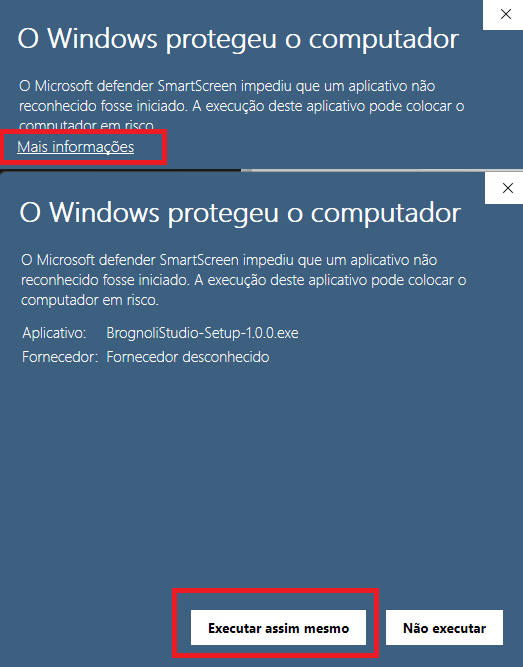
First Windows installation
Because Studio is still a new application, Windows may show a standard protection prompt the first time you run it. The installer published here is the official BROGNOLI build and is safe to continue with.
Problem and solution
Less operational work. More time for analysis.
BROGNOLI Studio was built to reduce the most time-consuming Power BI tasks and give professionals more speed when building, reviewing, and improving analytics.
Where Studio creates impact
It focuses on the areas that consume the most time in real-world projects.
- - Slow and repetitive DAX work
- - Lack of standards and documentation
- - Visual adjustments that consume too much time
- - Difficulty diagnosing bottlenecks in the model
Practical outcome
More standardization, more autonomy, and more ability to focus on what actually creates value.
Capabilities
A platform designed for the full workflow
From DAX to performance, from governance to visual creation, Studio connects workflows that are usually spread across multiple tools.
DAX and productivity
Create, format, document, and improve measures using the full semantic model context.
Governance and quality
Inspect objects, standards, relationships, and best practices to keep models healthier.
Performance and diagnostics
Investigate query behavior, execution times, and bottlenecks with advanced workflows.
Visual creation with AI
Generate dashboard backgrounds, themes, and visual structures in a much faster way.
Who it is for
Built for professionals who need speed with quality
Ideal profile
If you work with Power BI regularly, the productivity and consistency gains tend to be immediate.
- - Power BI analysts and developers
- - Consultants and freelancers who need to scale
- - BI teams seeking governance and productivity
- - Professionals who want AI with real model context
How Studio fits your routine
Use Studio to accelerate repetitive work, strengthen model governance, and improve the quality of what you deliver.
It is designed to work as a day-to-day companion, not as a one-off tool.
That means more execution speed and more clarity when standardizing what your team delivers.
Visual proof
See real parts of the product in action
Click any image to enlarge it and explore the interface details more clearly.
Pricing
Plans and trial
Choose the right level for your workflow, enter the subscriber area, and manage trial, subscription, and credits in one place.
BROGNOLI Studio plans
Every plan includes a 15-day trial and takes you into the subscriber area, where subscription, credits, and next steps stay centralized.
Light
US$ 4.90/month
0 credits
Bring your own API or use manual mode
Starter
US$ 9.90/month
2,000 credits
Ideal entry point for light Studio AI usage
Pro
US$ 19.90/month
6,000 credits
Best value for recurring workflows
Expert
US$ 39.90/month
15,000 credits
For heavier project and consulting workflows
Business
US$ 99.90/month
50,000 credits
For teams, operations, and scale
Extra credits
One-off packs to expand your usage without changing plans. They appear in your subscriber area and add to your existing balance.
1,000 credits
US$ 6.90
Extra pack to complement your plan whenever needed
5,000 credits
US$ 29.90
Ideal for delivery peaks and stronger AI usage
10,000 credits
US$ 59.90
More scale for intensive workflows and one-off boosts
Final call
If Power BI is part of your routine, Studio was built for you
BROGNOLI Studio has a simple goal: reduce friction, improve quality, and give you more time to create value with data.
Start by creating your account. From there you enter the subscriber area, choose a plan, track credits, buy extra packs, and manage your subscription.